Everything you need to know about switching to Teya with Klipy UK.
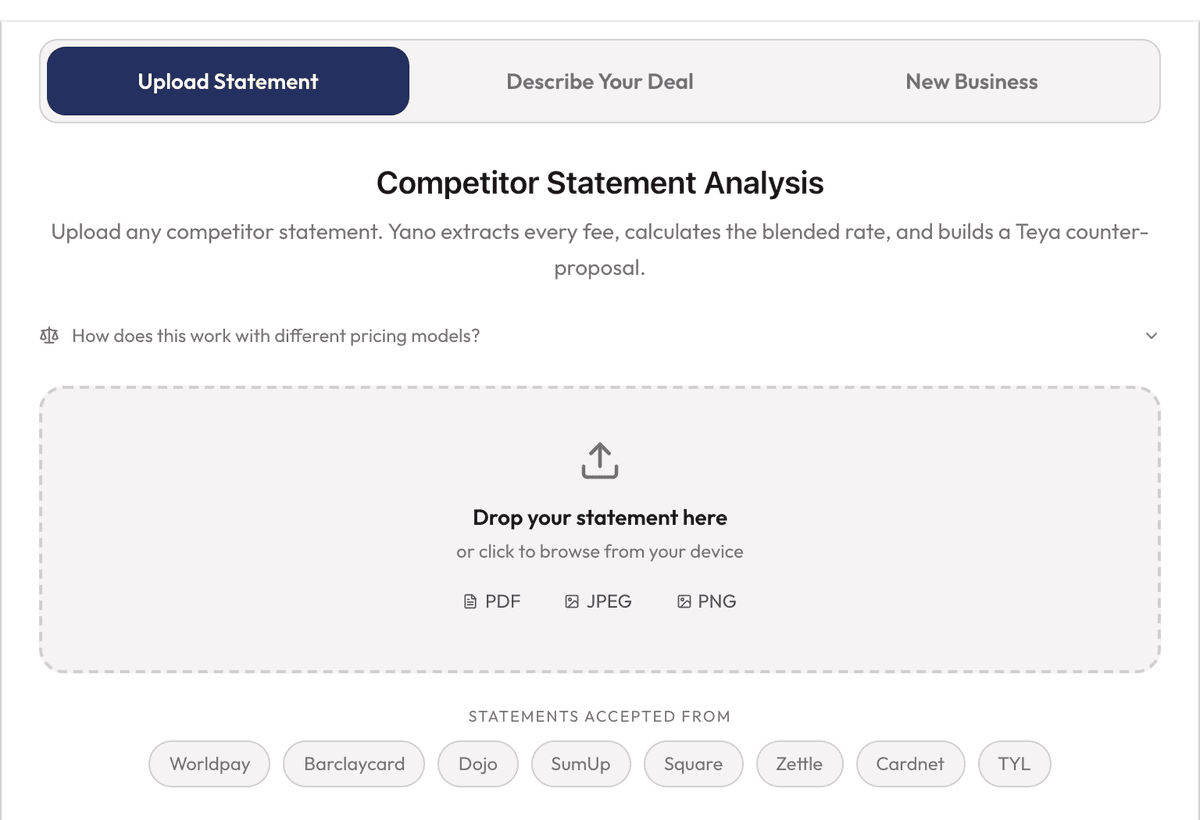
Upload your current card processing statement or enter your monthly turnover and average transaction value. Our AI analyses your statement in seconds and shows you a side-by-side comparison of your current rates vs Teya's pricing. It's free, instant, and there's no obligation.
Typically 3-5 business days from application to going live. We handle the entire process: terminal delivery, ePOS integration, and staff training. There's no disruption to your business.
Teya offers flexible terms including rolling contracts. We earn your business every month, not through lock-in clauses. Speak to us about the best option for your business.
No. We can set up your new Teya terminal alongside your existing one. Once you're happy, you cancel your old provider on your own terms. Zero downtime.
Teya runs a standard Customer Due Diligence (CDD) check during onboarding. You complete a digital questionnaire via the Teya App, then provide an ID photo and a selfie for identity verification. You will also need proof of business (Companies House registration, HMRC tax return, VAT certificate, or business bank statement). The review takes 24 to 48 hours. You can begin accepting payments during this period, though settlements may be held until verification is complete. Teya may also request a periodic KYC refresh to maintain regulatory compliance.
Teya offers two contract types. Flexible (rolling): no lock-in period, cancel at any time with no exit fees. You purchase your terminal outright. Fixed (12-month): terminal is provided on rental. If you need to exit early, you would pay the remaining terminal rent plus a cancellation fee. Both options have the same transaction rates. If your terminal is inactive for 90 consecutive days, Teya stops billing automatically.
Yes. Both the person referring and the new merchant receive a £50 prepaid Visa card. The new merchant must process at least £500 in card payments within 30 days of going live. You can share your unique referral link from the Teya App or Business Portal.
Teya offers tiered pricing typically between 0.50% and 1.59%, depending on your business type, card mix, and volume. The 0.50% rate is available for businesses with a monthly card turnover of 200,000 and above. This is significantly cheaper than flat-rate providers like SumUp (1.69%) or Square (1.75%) for most established businesses.
No. Your rate is your rate. There are no PCI compliance fees, no statement fees, and no surprise charges. Terminal rental (if applicable) is clearly stated upfront.
The Minimum Volume Fee is a monthly fee of £29 that applies to new customers (onboarded after 3rd March 2026) whose actual monthly card payment volume (TPV) falls below £2,500. It does not apply to existing customers. The fee is based on actual TPV transacted in the relevant month, not on expected volume at onboarding.
No. Teya only evaluates your TPV starting from your first full calendar month. For example, if you onboard on 5th April, your first evaluated month is May. Even then, Teya skips the fee for the first evaluated month if you're below threshold and sends an email explaining the policy. The fee only applies from the second evaluated month onward if TPV remains below £2,500.
Teya uses an activity check to protect you. If you transacted on fewer than 7 days in a month, they assume you were inactive (e.g. on holiday) and waive the fee. However, if you transact fewer than 7 days for more than 2 consecutive months, the fee applies again from the third month.
Seasonal businesses are evaluated on a rolling 3-month average rather than strict month-by-month. If your average TPV over the last 3 months is above £2,500, the fee does not apply, even if one individual month was below. For customers with less than 3 months of history, the rolling average up to that point is used.
Teya offers four settlement options. Business Day settlement (standard, no extra cost) sends funds on the next working day. Everyday settlement (Teya Business Account, +0.1%) sends funds daily including weekends and bank holidays. Instant settlement (Teya Business Account, +0.2%) delivers funds within minutes of each transaction. Scheduled settlement lets you choose a fixed cycle of every 3, 7, 14, or 30 days at no additional cost. Settlements are processed overnight and typically arrive between 8am and 5pm. Note: there is a minimum settlement threshold of £15.
Settlement can occasionally be postponed for a few reasons: new customer verification still in progress, incorrect payment details on file, or an outstanding balance with Teya. If your settlement is delayed, contact us and we'll get it resolved quickly.
Your total cost with Teya is made up of two components: transaction fees (the cost for processing each card payment) and hardware or product charges (costs for terminals or e-commerce products). There are no membership fees, no PCI compliance fees, and no hidden extras. If your monthly card volume falls below £2,500, a Minimum Volume Fee may apply.
A free business account that comes with your Teya setup. It offers 0.5% unlimited cashback on all purchases, 30 free ATM withdrawals per month, Visa business cards, and 24/7 fraud monitoring. Settlements go directly into this account 365 days a year, including weekends and bank holidays.
Teya is not a bank but an Electronic Money Institution (EMI), authorised by the Financial Conduct Authority (FCA) to provide Business Account services. The key differences: EMIs cannot engage in traditional lending (which is why Teya partners with Liberis, YouLend, and iwoca for business funding), and EMI accounts are not covered by the Financial Services Compensation Scheme (FSCS) which protects bank deposits up to £85,000.
Teya keeps 100% of your Business Account balance in ring-fenced accounts held by Banking Circle, a fully licensed commercial bank. This means your funds are completely separated from Teya's operating funds and protected at all times.
Both new and existing Teya acquiring customers are eligible. The Business Account is associated with your company, so multi-store businesses can also sign up. There is no additional verification process if you're already a Teya merchant.
Visa cards typically arrive within 10 working days. If your card hasn't arrived after 10 working days, we recommend ordering a new one. When doing so, double-check the delivery address is correct.
Yes. Teya Business Accounts have three tiers based on your annual card sales: under £60,000 (standard limits), £60,000 to £130,000 (enhanced limits), and over £130,000 (premium limits with the highest allowances). You can request an increase up to the upper level of your tier at any time by contacting the support team. Increases beyond the upper limit require additional approval but can be requested.
Yes. You can deposit cash at over 28,000 PayPoint locations across the United Kingdom. Each deposit costs £2, with a maximum of £500 per transaction. Monthly deposit limits vary depending on your account tier. Simply use the deposit function in the Teya App to generate a barcode, then present it at any PayPoint location.
The Teya App (iOS and Android) and Business Portal (web) let you view transactions, track settlements, manage Pay by Link payments, accept Tap to Pay payments, and monitor your Business Account balance. Download the app or log in at the portal using your Teya ID, the email you provided during onboarding.
A negative balance occurs when your total deductions from fees, chargebacks, or refunds exceed the total amount you transacted on a given day. Teya will recover the negative balance from future settlements automatically. You do not need to make a manual payment.
Yes. You can issue refunds and track chargeback cases directly from the Teya App or Business Portal. The dashboard shows the status of each dispute, any fees applied, and how they affect your settlement balance. Customers do not need to be present for a refund to be processed.
Three options. Teya Pro: a full-size Android smart terminal with built-in receipt printer, £139 outright or £14.99 per month. Supports Tips, Split Bill, DCC (25+ currencies), Pre-auth, MOTO, Pay by Link, Quick Amounts, and Payment Reference. Teya Go: a compact portable Bluetooth terminal, £69 outright (no rental). Pairs with your phone via the Teya App and has a built-in SIM for mobile connectivity. Tap to Pay: turns your iPhone (XS or later, iOS 18.4.1+) or Android phone (Android 12+ with NFC) into a contactless terminal for free. All options accept contactless, chip and PIN, Apple Pay, and Google Pay.
Your terminal arrives pre-configured. Simply power it on, connect to your WiFi network, and follow the on-screen setup guide. If you need ePOS integration, we handle that for you. Most merchants are up and running within minutes of unboxing.
Teya terminals work over WiFi or mobile data (4G). For best performance, a stable broadband connection is recommended. The Teya Go also has a built-in SIM for mobile connectivity, making it perfect for market traders, pop-ups, and deliveries.
First, check that your WiFi network is working with another device. Then restart your terminal by holding the power button for 10 seconds. Go to Settings and re-enter your WiFi password. If the issue persists, contact us and we'll troubleshoot remotely or arrange a replacement.
Teya integrates with 50+ ePOS systems including ePOS Now, Lightspeed, Swoopos, and many more. Integration is via cloud (POSLink) or app-to-app connection. We handle the integration for you during setup.
Tap to Pay turns your phone into a contactless card terminal. It requires an iPhone XS or later running iOS 18.4.1 or above, or an Android device running Android 12 or later with NFC capability. You must have the Teya App installed. There is no additional hardware needed and it is completely free to activate. Customers simply tap their card or phone on your device to pay. A PIN is required for transactions above the contactless limit. Perfect as a backup or primary terminal for sole traders and mobile businesses.
Teya provides a free Pay by Link feature, allowing you to send payment links to customers via SMS, email, or WhatsApp. Ideal for phone orders, deposits, or invoicing. For full e-commerce integration, speak to us about your requirements.
You can track Pay by Link payment statuses through the Teya App or Business Portal. Each link shows whether it has been sent, opened, paid, or expired. Links created on the terminal expire after 30 minutes or 24 hours, while links created via the App or Portal let you set a custom expiry date.
Restart your terminal at least once a week by powering it off and back on. Keep the battery above 10% to avoid issues with payments and receipt printing. If the paper roll runs out or is not seated correctly, open the printer compartment and replace or reseat it. If you see a "Terminal Not Configured" error, contact support so they can access the terminal remotely and fix it.
24/7 UK-based human support. Not a chatbot, not an overseas call centre. You also get a dedicated account manager, Jamal, who knows your business and is available via WhatsApp, phone, or email.
Yes. Teya Solutions Ltd. is authorised by the Financial Conduct Authority under the E-Money Regulations 2011 (Reference no. 978181). As an Electronic Money Institution, Teya must meet strict regulatory standards for handling your funds.
Teya offers business funding through three partners: Cash Advances via Liberis and YouLend (£1,000 to £1,000,000, repaid as a percentage of daily card sales), and Flexi Loans via iwoca (revolving credit from £1,000 to £500,000, draw what you need when you need it). No fixed monthly repayments on Cash Advances. You only pay when you earn.
Contact us immediately and we'll troubleshoot the issue. If it can't be resolved remotely, we'll arrange a replacement terminal, typically delivered within 1-2 business days. In the meantime, you can use Tap to Pay on your phone as a backup so you never miss a sale.
Refunds can be processed directly from your Teya terminal, Teya App, or Business Portal. The customer does not need to be present. For chargebacks (when a customer disputes a transaction with their bank), there is a non-refundable fee of £20 per case. Customers have up to 120 days from the transaction date to raise a dispute. The process has four stages: Initiation (customer files with their bank), Disputed (you provide evidence within the deadline), Pre-arbitration (second review if unresolved), and Arbitration (card scheme makes the final decision, with a €500 fee to the losing party). Teya's dedicated team guides you through every step and helps you compile the strongest possible evidence.
Always confirm transactions with a signature, PIN, or contactless tap. Use pre-authorisation for hotels and restaurants. Keep all receipts and proof of delivery. Respond to chargeback notifications promptly with complete evidence. If a customer asks for a refund, processing it directly is usually quicker and cheaper than waiting for a chargeback.
MOTO stands for Mail Order / Telephone Order. It is a payment method that allows a merchant to manually key in a customer's card details directly on their Teya Pro terminal, without the card or the customer being physically present. The merchant enters the transaction amount, then types in the card number, expiry date, and CVV. The payment processes like a standard card transaction, but without a physical tap, insert, or swipe. It is designed for businesses that regularly take orders or bookings over the phone.
MOTO is available to limited companies only (not sole traders) that have been operational for at least 6 months and can demonstrate 6 months of MOTO transaction history with a previous acquirer. Eligible business types include restaurants and takeaways, hotels, medical and dental practices, caterers, florists, trade suppliers, and other businesses with a genuine need to take card payments over the phone. A risk review is completed for every MOTO application.
MOTO carries a surcharge on top of your existing Teya transaction rate to reflect the higher risk of card-not-present payments. For unblended pricing, the surcharge is +0.5%. For blended pricing, it is +1.0%. Hotels and lodging businesses have a higher surcharge of +1.5% regardless of pricing model. For example, a restaurant on a 1% blended rate would pay 2% in total for MOTO transactions.
Yes. MOTO is an add-on capability to your existing Teya acquiring account. Your in-person card payments continue at your standard rate. Only the transactions processed using Manual Entry on the terminal will carry the MOTO surcharge. Both transaction types are visible in a single Teya dashboard.
Klipy UK is an Independent Sales Channel (ISC) of Teya, specialising in helping UK small and medium businesses find better card payment solutions. We use AI-powered analysis to show merchants exactly where they're overpaying and how much they can save.
You get the same Teya rates and products, plus a dedicated local partner who handles your entire switch, provides ongoing support, and uses AI tools to continuously optimise your setup. Think of us as your payments consultant, at no extra cost.
The easiest first step is to use our free rate comparison tool at klipy.uk/calculator. Upload your existing statement or enter your monthly turnover, and we will show you exactly what you would pay with Teya. If you want to talk it through, book a free 15-minute call with Jamal directly from the website. No pressure, no obligation.
Klipy UK is an authorised Independent Sales Channel (ISC) of Teya Solutions Ltd., which is authorised by the Financial Conduct Authority under the E-Money Regulations 2011 (Reference no. 978181). As an ISC, we operate within Teya's regulatory framework and are bound by their compliance standards.
Pay By Link lets you generate a payment link and send it to your customer via WhatsApp, SMS, or email. The customer simply taps the link, enters their card details on a secure Teya-hosted page, and pays. You get notified instantly. There is no physical terminal required. It is ideal for phone orders, deposits, invoicing, and remote bookings.
No additional fee. Pay By Link transactions are charged at your standard Teya transaction rate, the same as if the customer tapped their card in person. There is no monthly subscription or per-link fee.
Pay By Link accepts all major credit and debit cards including Visa, Mastercard, and American Express, as well as Apple Pay and Google Pay on compatible devices. It covers both consumer and business cards.
Yes. Links created on the Teya terminal expire after 30 minutes or 24 hours. Links created via the Teya App or Business Portal let you set a custom expiry date, giving you full flexibility for things like deposits on bookings made weeks in advance.
Yes. Teya Online Payments integrates directly with Shopify and WooCommerce through Hosted Checkout. Your customers build their basket on your store, click Pay, and are redirected to a secure Teya-branded checkout page where they can pay by card, Apple Pay, or Google Pay. Once paid, they are redirected back to your store. The Shopify plugin is free to install and takes minutes to set up. For businesses that do not need a full e-commerce integration, Pay By Link covers most use cases without any technical work.
Install the Teya Payments plugin from the Shopify App Store, sign into your Shopify account, then log in with your Teya ID. Select the Teya store you want to connect, and you are ready to accept online payments. The whole process takes about five minutes. Your Shopify store will display a Teya-branded checkout page where customers can pay securely.
Yes. Teya Hosted Checkout integrates with WooCommerce in addition to Shopify. The setup process is similar: install the Teya plugin, connect it with your Teya account, and your online store is ready to accept payments through Teya.
Online transactions are charged at your existing Teya rate plus 0.2 percent. For example, if your in-store rate is 1.1 percent, your online rate would be 1.3 percent. There is no monthly fee, no setup fee, and no per-transaction surcharge beyond the rate. E-commerce requires a separate store in the Teya system, but this does not affect your existing terminal pricing.
Tap to Pay turns your iPhone (XS or later, iOS 18.4.1+) or Android phone (Android 12+ with NFC) into a contactless terminal. Customers tap their card or phone directly on your device to pay. There is no extra hardware to buy or rent, and there is no activation fee. It is completely free to use and charges your standard transaction rate per payment. A PIN is required for transactions above the contactless limit. It is perfect as a primary terminal for sole traders or as a backup so you never miss a sale if your main terminal has an issue.
We manage the entire switch for you. Once you decide to go ahead, we submit the Teya application on your behalf, arrange delivery of your new terminal, and handle any ePOS integration. The process typically takes 3 to 5 business days from application to going live. You do not need to do anything with your existing provider until you are fully set up and happy.
No. We always recommend setting up your new Teya terminal and running it alongside your existing provider for a short period. Once you are confident everything is working correctly, you can cancel your old provider on your own terms. This means zero downtime and no risk to your business.
This is one of the most common situations we deal with. Many merchants are stuck in 12 to 36 month contracts with significant exit fees. We will review your contract with you, calculate the true cost of staying versus leaving, and in some cases negotiate directly with your current provider. The savings with Teya often outweigh exit fees within the first few months.
No. Because we run the new terminal alongside your existing one during the transition, there is no gap in your ability to take card payments. We do not recommend cancelling your old provider until your new setup is fully operational and you have processed at least a few days of transactions through Teya.
In most cases, yes. Teya integrates with 50 or more ePOS systems, including most of the major UK platforms. We will check compatibility with your specific setup before you commit to anything. If your ePOS is not supported, we can advise on alternatives that integrate natively with Teya.
Upload your most recent card processing statement to our free calculator at klipy.uk/calculator. Our AI reads the statement in seconds and produces a side-by-side cost comparison showing your current rate versus what you would pay with Teya. Most businesses are overpaying by between £100 and £500 per month. The analysis is free, instant, and there is no obligation whatsoever.
Teya integrates with over 50 ePOS systems, including ePOS Now, Lightspeed, Swoopos, Tevalis, Vita Mojo, and many more. Whether you run a restaurant, retail shop, salon, or hospitality venue, there is almost certainly a native integration available. Contact us with your current ePOS and we will confirm compatibility.
Teya supports two types of integration. POSLink is a cloud-based connection where your ePOS sends the payment amount directly to the terminal over the internet, and the terminal confirms back once the card is tapped. App-to-app integration connects your ePOS app directly to the Teya terminal app on Android. Both methods eliminate manual entry of amounts, reducing errors and speeding up service.
No. ePOS integration is included as part of your Teya setup. There are no setup fees, no API subscription charges, and no ongoing integration costs beyond your standard transaction rate and any hardware you choose.
Yes, in most cases. Teya is designed to slot in alongside your existing setup. The terminal integrates with your ePOS so your workflow remains exactly the same. You do not need to change your staff training, your menu management, or your reporting. The only thing that changes is that your card transactions process through Teya at a lower rate.
If your ePOS does not have a native Teya integration, you can still use Teya as a standalone payment terminal alongside it. You would enter amounts manually on the terminal, which is how most businesses without integration operate today. Alternatively, we can advise on ePOS platforms that do integrate natively with Teya if you are open to switching.
Yes. Teya integrates with Xero and QuickBooks. Transactions and settlements sync automatically to your accounting software, saving you hours of manual reconciliation. Connect via the Teya App or Business Portal. Note that the Xero integration requires re-authentication every 90 days.
Yes. Teya has four team roles. Super Admin: full access to all features, settings, and team management. Admin: access to everything except team management and some account settings. Accountant: view-only access to transactions, settlements, and financial reports. Cashier: can process payments and refunds but cannot view reports or change settings. You manage team members through the Teya App or Business Portal.
A Merchant Cash Advance (MCA) is not a traditional loan. You receive a lump sum upfront, which is repaid automatically as a small percentage of your daily card sales. On a quiet day you repay less. On a busy day you repay more. There is no fixed monthly repayment and no interest rate in the traditional sense. Instead, you agree on a fixed total repayment amount upfront. Teya partners with Liberis and YouLend to offer Cash Advances, and with iwoca for Flexi Loans, to eligible UK merchants.
Cash Advance amounts typically range from £1,000 to £1,000,000, depending on your monthly card turnover and trading history. As a guide, the advance is roughly 1.2 times your average monthly card turnover. So a business doing £20,000 per month could access approximately £24,000. The Flexi Loan via iwoca offers revolving credit from £1,000 to £500,000.
You choose your repayment speed: Quick (20 percent of daily card sales), Moderate (15 percent), or Gradual (10 percent). The deduction happens automatically before settlement arrives in your account, so you never miss a payment. There is no set repayment period. If your sales are strong, you repay faster. If you have a quiet month, you repay less. Either way, you always pay the same agreed total. Renewals are available from around 50 percent repaid, and 85 percent of merchants renew their funding.
Teya works with three trusted funding partners. For Cash Advances, Liberis and YouLend both offer lump-sum funding repaid as a percentage of your daily card sales. YouLend has funded over 350,000 SMEs with a 90 percent approval rate and a 4.8 Trustpilot rating. For revolving credit, Teya Flexi Loan is provided through iwoca and works like a business overdraft. You only pay interest on what you draw, and there are no early repayment fees. We assess all options and recommend the best fit for your situation.
No. MCA providers typically use a soft credit check or review your trading history and bank statements rather than running a hard credit search. This means applying will not leave a mark on your credit file or lower your credit score.
To be eligible, your business generally needs to have been trading for at least 86 days, with a minimum of £1,000 per month in card turnover and 10 or more card transactions per month. You must not operate in excluded sectors such as gambling, adult content, or cryptocurrency, and must not have outstanding County Court Judgments. If you are unsure, use the eligibility check on our Funding page or speak to us directly.
Once approved, YouLend can fund the same day. The application process requires open banking or bank statements, details of any shareholders with 25 percent or more ownership, and your trading address. Most applications receive an offer within a few hours. If you need funding urgently, let us know and we will prioritise your case.
The funding can be used for any business purpose including purchasing stock, covering unexpected costs, paying a tax liability, buying new equipment, or boosting cashflow during quiet periods. Unlike some traditional lenders, there are no restrictions on how you use the funds.
Teya Flexi Loan is a revolving credit line provided through iwoca. Unlike a Cash Advance where you receive a lump sum, Flexi Loan works like a business overdraft. You get a credit limit between £1,000 and £500,000 and draw funds whenever you need them. You only pay interest on what you actually use, not the full limit. There are no setup fees and no early repayment fees. For amounts under £25,000, no documents are required. Interest starts from approximately 1 percent per month. You can have a Flexi Loan and a Cash Advance at the same time.
We are here to help. Get in touch with Jamal or try our AI-powered savings calculator.